JVM (Java Virtual Machine) is an abstract machine. It is a
specification that provides runtime environment in which java bytecode
can be executed.
JVMs are available for many hardware and software platforms (i.e. JVM is platform dependent).
- A specification where working of Java Virtual Machine is specified. But implementation provider is independent to choose the algorithm. Its implementation has been provided by Sun and other companies.
- An implementation Its implementation is known as JRE (Java Runtime Environment).
- Runtime Instance Whenever you write java command on the command prompt to run the java class, an instance of JVM is created.
What it does
The JVM performs following operation:
- Loads code
- Verifies code
- Executes code
- Provides runtime environment
JVM provides definitions for the:
- Memory area
- Class file format
- Register set
- Garbage-collected heap
- Fatal error reporting etc.
Internal Architecture of JVM
Let's understand the internal architecture of JVM. It contains classloader, memory area, execution engine etc. 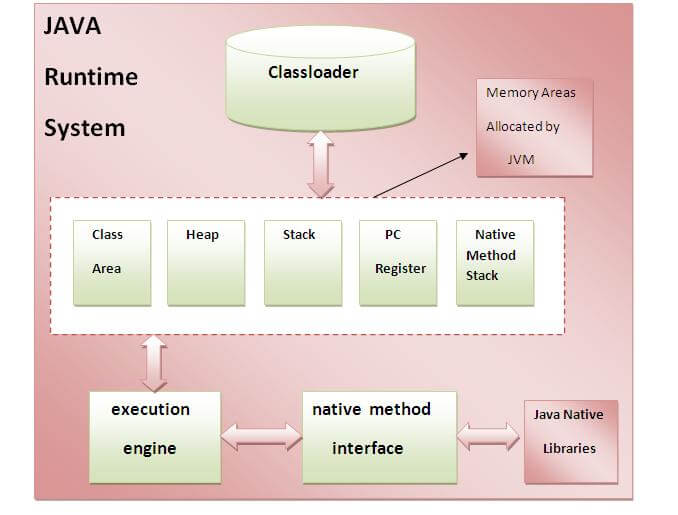 |
1. Class Loader Subsystem
Java's dynamic class loading
functionality is handled by the class loader subsystem. It loads,
links. and initializes the class file when it refers to a class for the
first time at runtime, not compile time.
1.1 Loading
Classes will be loaded by this component. Boot Strap class
Loader, Extension class Loader, and Application class Loader are the
three class loader which will help in achieving it.
- Boot Strap ClassLoader – Responsible for loading classes from the bootstrap classpath, nothing but rt.jar. Highest priority will be given to this loader.
- Extension ClassLoader – Responsible for loading classes which are inside ext folder (jre\lib).
- Application ClassLoader –Responsible for loading Application Level Classpath, path mentioned Environment Variable etc.
The above Class Loaders will follow Delegation Hierarchy Algorithm while loading the class files.
1.2 Linking
- Verify – Bytecode verifier will verify whether the generated bytecode is proper or not if verification fails we will get the verification error.
- Prepare – For all static variables memory will be allocated and assigned with default values.
- Resolve – All symbolic memory references are replaced with the original references from Method Area.
1.3 Initialization
This is the final phase of Class Loading, here all static variables will be assigned with the original values, and the static block will be executed.
2. Runtime Data Area
The Runtime Data Area is divided into 5 major components:
- Method Area – All the class level data will be stored here, including static variables. There is only one method area per JVM, and it is a shared resource.
- Heap Area – All the Objects and their corresponding instance variables and arrays will be stored here. There is also one Heap Area per JVM. Since the Method and Heap areas share memory for multiple threads, the data stored is not thread safe.
- Stack Area – For every thread, a separate runtime stack will be created. For every method call, one entry will be made in the stack memory which is called as Stack Frame. All local variables
will be created in the stack memory. The stack area is thread safe
since it is not a shared resource. The Stack Frame is divided into three
subentities:
- Local Variable Array – Related to the method how many local variables are involved and the corresponding values will be stored here.
- Operand stack – If any intermediate operation is required to perform, operand stack acts as runtime workspace to perform the operation.
- Frame data – All symbols corresponding to the method is stored here. In the case of any exception, the catch block information will be maintained in the frame data.
- PC Registers – Each thread will have separate PC Registers, to hold the address of current executing instruction once the instruction is executed the PC register will be updated with the next instruction.
- Native Method stacks – Native Method Stack holds native method information. For every thread, a separate native method stack will be created.
3. Execution Engine
The bytecode which is assigned to the Runtime Data Area will be executed by the Execution Engine. The Execution Engine reads the bytecode and executes it piece by piece.
- Interpreter – The interpreter interprets the bytecode faster, but executes slowly. The disadvantage of the interpreter is that when one method is called multiple times, every time a new interpretation is required.
- JIT Compiler – The JIT Compiler neutralizes the
disadvantage of the interpreter. The Execution Engine will be using the
help of the interpreter in converting byte code, but when it finds
repeated code it uses the JIT compiler, which compiles the entire
bytecode and changes it to native code. This native code will be used
directly for repeated method calls, which improve the performance of the
system.
- Intermediate Code generator – Produces intermediate code
- Code Optimizer – Responsible for optimizing the intermediate code generated above
- Target Code Generator – Responsible for Generating Machine Code or Native Code
- Profiler – A special component, responsible for finding hotspots, i.e. whether the method is called multiple times or not.
- Garbage Collector: Collects and removes unreferenced objects. Garbage Collection can be triggered by calling "System.gc()", but the execution is not guaranteed. Garbage collection of the JVM collects the objects that are created.


No comments:
Post a Comment